
Tinder Shadowban: How to Tell & Fix It [2026]
 David
David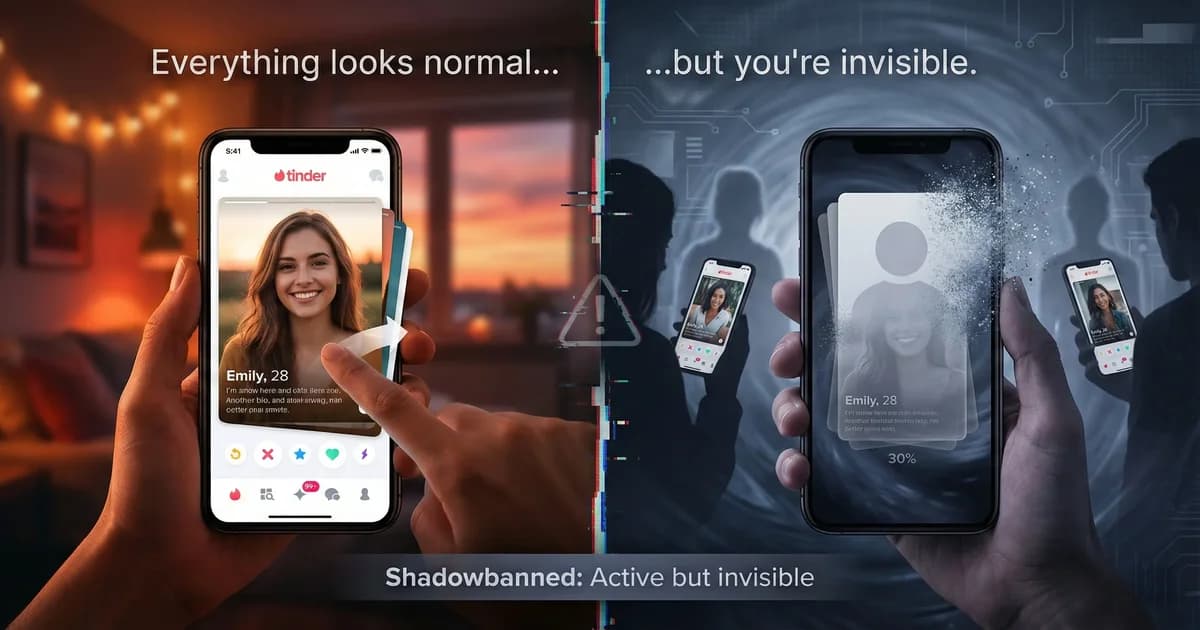
Three weeks ago, you were getting matches. Not a ton, but enough.
Then it stopped.
You keep swiping. You update your photos. You rewrite your bio. You delete and reinstall the app. Nothing changes.
Zero matches. Zero likes. Complete silence.
You think maybe it's your photos. Maybe the algorithm is punishing you for something. Maybe Tinder is broken.
You've been shadowbanned. Or have you?
Here's the thing most guys don't realize: the majority of guys who think they're shadowbanned actually aren't. They just have a weak profile. I'll show you how to tell the difference—so read to the end before you panic.
But if you are truly shadowbanned, Tinder won't tell you. There's no warning. No email. No notification. Your account looks perfectly normal to you.
But you're invisible to everyone else.
Key Takeaways
- Most guys who think they're shadowbanned actually just have a weak profile
- A real shadowban means zero matches, zero likes—not just fewer matches
- Shadowbans are permanent—there's no expiration or appeals process
- The only real fix requires a complete hard reset (new number, device, photos)
- Tinder cross-references device ID, phone number, photos, and payment data to detect ban evasion
What Is a Tinder Shadowban?
A shadowban is when Tinder secretly restricts your account's visibility without telling you.
You can still log in. You can still swipe. You can still message your existing matches.
But new users can't see you. Your profile is hidden from the stack.
It's different from a regular ban. With a regular ban, Tinder kicks you off and tells you why. With a shadowban, everything looks normal on your end, but you're getting zero results.
According to multiple dating app experts, Tinder uses shadowbans to punish users who violate terms of service without completely removing them from the platform. It's a silent penalty designed to keep you engaged (and potentially spending money on premium features) while protecting their user base from problematic accounts.
6 Signs You're Shadowbanned on Tinder
1. Your Matches Completely Dried Up
You used to get at least a few matches per week. Now? Nothing. For days. Even weeks.
If you live in a populated area and you're getting zero matches after several days of active swiping, that's not normal. It's the first red flag.
One user reported going from several matches a week to maybe one every few weeks, then nothing at all. That sudden drop is classic shadowban behavior.
2. Your "Likes You" Tab Is Empty (Tinder Gold/Platinum)
If you have Tinder Gold or Platinum, check your "Likes You" section. A shadowbanned account will show zero new likes, even after days of active swiping.
In a normal account in any decent-sized city, you'd see at least some activity. Complete silence for days is a huge red flag.
3. You Didn't Get the New Account Boost
Tinder gives new accounts a visibility boost for the first 24-48 hours. It's designed to hook you in with early matches.
If you delete your account, create a fresh one, and still get zero matches during that crucial first period, you're likely shadowbanned.
The algorithm recognizes your device, photos (using perceptual hashing), or phone number and applies the shadowban to your "new" account immediately.
This is where most guys realize something is wrong. The new account boost is universal—if you're not getting it, you're flagged.
4. You're Matching at an Impossibly Low Rate
You're swiping right on everyone—literally everyone—and getting nothing back.
In a normal scenario, even users with low attractiveness ratings get occasional matches. Zero matches across all attractiveness levels suggests your profile isn't being shown to anyone.
5. Existing Conversations Go Silent
Your current matches stop responding. Not just one or two—everyone.
This can happen if Tinder flags your account and existing matches see a warning, or your profile becomes less visible in their message queue.
While this alone doesn't confirm a shadowban, combined with other signs, it's telling.
6. You Recently Violated Tinder's Guidelines (Or Someone Thinks You Did)
Think back. Did you:
- Get reported by multiple users?
- Use Tinder automation tools, bots, or auto-swipers?
- Create multiple accounts from the same phone or device?
- Swipe right on absolutely everyone (spam behavior)?
- Send inappropriate messages or share explicit photos?
- Promote your Instagram, Snapchat, Venmo, or OnlyFans in your bio?
- Upload AI photos from ChatGPT, Google, or other cheap generators?
If any of these apply, Tinder may have flagged your account.
Shadowbanned on Tinder? Start over with new photos.
Our free AI review scores your photos, spots weak points, and tells you exactly what to fix — in under 30 seconds.
Get Your Free Profile ReviewWhy Does Tinder Shadowban Instead of Outright Banning?
Two reasons: retention and plausible deniability.
If Tinder outright banned you, you'd know immediately and create a new account (or leave the platform). With a shadowban, you keep swiping, hoping things will improve.
You might even buy Tinder Gold or Platinum thinking paid features will help. Spoiler: they won't.
Tinder keeps you on the platform (and potentially spending money) while protecting their user base from accounts they've deemed problematic.
It's also a way to handle ambiguous cases. If you've been reported a few times but not enough for a clear ban, Tinder can quietly limit your reach and see if problems persist.
And because they never admit shadowbans exist, they avoid the PR nightmare of explaining their enforcement system.
The Only Real Fix for a Tinder Shadowban
Here's the hard truth: shadowbans are permanent.
There is no "un-shadowbanning." There's no appeal process. Tinder support won't help. Waiting it out won't work.
The only solution is a complete hard reset.
How to Reset Your Tinder Account (The 2026 Method)
Tinder doesn't just check one thing—it cross-references multiple signals including your device ID, phone number, IP address, payment history, photo hashes, Apple ID or Google account, and linked social media. If even one of these connects to your old profile, your new account gets flagged.
And this doesn't always happen immediately. Some users report getting re-banned days after creating a new account, suggesting Tinder runs delayed checks on new signups.
Here's how to do a proper hard reset:
Step 1: Delete Your Current Account Completely
Go into Tinder settings and permanently delete your account. Don't just log out—delete it entirely.
Then uninstall the app.
Step 2: Wait 3+ Months (Seriously)
This is the step most people skip. Don't.
Waiting 3+ months before creating a new account is the most reliable way to ensure Tinder's system doesn't immediately flag you.
I know it sucks. But if you try to reset immediately, you're playing whack-a-mole with Tinder's detection systems.
Step 3: Get a New Phone Number
Tinder tracks your phone number aggressively. You need a completely new number that's never been associated with Tinder before.
Options: Google Voice, Burner app, or a cheap prepaid SIM card.
Step 4: Use Completely New Photos
Tinder uses perceptual hashing (pHash) to detect the visual structure of images—even if you screenshot them or edit them slightly.
Don't reuse your old photos. Even if you crop them differently or apply filters, Tinder can recognize the underlying image structure.
You need entirely new pictures. Ideally, photos you've never uploaded to any dating app before.
And here's where most guys make a critical mistake: they scramble to take new selfies or recycle old photos, ending up with the same low-quality images that weren't working before.
If you're going to reset your account, this is your chance to start fresh with photos that actually work. Not just "new" photos—better photos.
The problem is, taking great dating photos is hard. Professional photographers are expensive ($300-500+) and often make you look too polished—like you're trying too hard. Women can tell, and it backfires.
But using cheap AI photo tools is even worse. Photos from tools like ChatGPT and Google Gemini are easily detected by Tinder's algorithms. They embed invisible watermarks, have unnatural lighting patterns, and produce subtle artifacts that scream "AI."
And if Tinder flags these images on your fresh account? You're shadowbanned again before you even get started.
This is exactly why we built GetMatches. Our AI is trained specifically on what women actually find attractive in dating profiles—the "female gaze." We don't use generic models that make you look like a stock photo. We generate natural, realistic images designed to match real smartphone photography at the pixel level — in our tests, 0% of images were flagged by AI detection tools.
No watermarks. No obvious AI artifacts. No robotic lighting. Just high-quality photos that look like they were taken by a friend with a good camera.
If you're resetting your Tinder account, you're already putting in the effort to start fresh. Don't waste that opportunity with low-quality photos. Get it right the first time.
Step 5: Use a Different Device (or Factory Reset)
Tinder tracks device IDs. Ideally, use a different phone or tablet when creating your new account.
If that's not possible, factory reset your current device. Make sure to back up your data first.
Even after a factory reset, avoid signing in with the same Apple ID or Google account you used on your banned profile.
Step 6: Change Your IP Address
Use a different Wi-Fi network or mobile data when creating your new account. Avoid using the same IP address Tinder associated with your banned account.
If you're at home, try using mobile data instead of Wi-Fi for the initial signup.
Step 7: Use Different Payment Information
If you had Tinder Gold, Plus, or Platinum on your old account, don't use the same credit card or payment method.
Tinder can link accounts through payment data. Use a different card, PayPal account, or payment method entirely.
Step 8: Don't Connect Old Social Media Accounts
Avoid linking your old Spotify or Instagram accounts. This is an easy way for Tinder to re-identify you.
If you must link social accounts, create fresh ones or use different accounts than you used before.
Step 9: Create Your New Account
Download Tinder fresh, use your new phone number, upload your new photos, and avoid any behavior that triggered the original shadowban.
Be selective with your swipes. Don't promote external platforms. Don't send inappropriate messages. Don't use bots or automation tools.
This is a lot of work. But it's the only method that reliably bypasses a shadowban in 2026.
How to Avoid Getting Shadowbanned (Prevention > Recovery)
Once you're shadowbanned, fixing it is a nightmare. Prevention is everything.
1. Don't Get Reported
The most common trigger is being reported by multiple users.
Avoid sending inappropriate messages, explicit photos, or anything that could be flagged as harassment—even if you think you're being playful or flirty.
If enough people report you, Tinder will shadowban your account without investigating context.
2. Don't Use Third-Party Tools
Automation tools, bots, and auto-swiping apps will get you banned.
Tinder's algorithm can detect abnormal swiping patterns and flag accounts using third-party software.
3. Don't Create Multiple Accounts on the Same Device
Repeatedly deleting and recreating your account triggers Tinder's spam detection.
If you've reset your account more than 2-3 times in a short period, you're at high risk.
4. Don't Swipe Right on Everyone
Swiping right indiscriminately signals bot behavior.
Tinder tracks your swipe-to-match ratio. If you're swiping right 100% of the time with a low match rate, the algorithm assumes you're spam.
5. Don't Promote External Platforms
Mentioning Instagram, Snapchat, OnlyFans, Venmo, or any external platform in your bio or messages can trigger a ban.
Tinder wants users to stay on Tinder. Taking conversations off-platform too early raises red flags.
6. Avoid Cheap AI Photo Tools
This one catches a lot of guys off guard. They use ChatGPT, Google Gemini, or some free AI image generator to make dating photos, upload them to Tinder, and get shadowbanned within days.
Tools like Google and OpenAI embed invisible watermarks in every image they generate. Tinder's detection algorithms read them instantly. If you're going to use AI photos, make sure you're using a tool that's actually built for dating apps—not a generic chatbot.
Wondering what's holding your profile back?
Our free AI review scores your photos, spots weak points, and tells you exactly what to fix — in under 30 seconds.
Get Your Free Profile ReviewWhat About "Soft Shadowbans" or "ELO Penalties"?
You'll see people online claim there are "soft shadowbans" or "ELO penalties" that can be fixed by taking a break from the app or adjusting your behavior.
Here's the truth: what people call a "soft shadowban" is usually just low ELO (attractiveness score).
If your profile has low engagement—few right swipes, few matches—Tinder shows you to fewer people. That's not a shadowban; it's the algorithm deprioritizing low-performing profiles.
A true shadowban is different: you're getting zero visibility, regardless of your ELO.
If you suspect low ELO rather than a shadowban, improving your photos, bio, and engagement can help. But if you're fully shadowbanned, no amount of profile improvement will matter.
Is It Worth Resetting?
If you're certain you've been shadowbanned, you have two options:
1. Move on to other apps. Try Hinge, Bumble, or other dating platforms. Tinder isn't the only option.
2. Do a complete hard reset. Follow the steps above, wait 3+ months, start fresh with new photos, and avoid the behaviors that got you banned.
The reset process is tedious and time-consuming. But if Tinder is your preferred platform and you're willing to start clean, it works.
Just remember: prevention is easier than recovery. Once you're back on the platform, avoid anything that could trigger another ban.
“Tinder's perceptual hashing is more sophisticated than most people realize — it can identify the same image even after cropping, color adjustments, or screenshot compression. When I engineer AI photos for dating profiles, making sure they don't share any hash fingerprints with banned accounts is a non-negotiable requirement.”
But Wait—Are You Actually Shadowbanned?
Here's the uncomfortable truth most guys don't want to hear: you're probably not shadowbanned.
If you're getting 1-2 matches per week, or even 1-2 matches per month, you're not shadowbanned. You just have a weak profile.
A shadowban means zero matches. Zero likes. Zero visibility. Complete radio silence for weeks, even in a major city.
If you're getting any matches at all—even if it's just a few low-quality matches per month—your account is fine. The algorithm is working. You're just not standing out to the women you're swiping on.
And that's actually good news. Because if you're not shadowbanned, you can fix it.
Bad photos are the #1 reason guys get terrible results on Tinder. Not the algorithm. Not shadowbans. Not competition. Just bad photos.
Mirror selfies, blurry group photos, bathroom pics, photos where you can barely see your face—these kill your matches before you even get started.
If you fix your photos, your results change overnight. You don't need a hard reset. You don't need to wait 3 months. You just need better images.
That's where GetMatches comes in. If you're getting some matches but not enough, or your matches aren't the quality you want, the problem isn't a shadowban—it's your photos.
Our AI generates natural, realistic photos optimized for what women actually find attractive. No watermarks. No detectable artifacts. Just high-quality images that get you results.
So before you spend weeks doing a hard reset, ask yourself: are you getting zero matches, or just not enough?
If it's the latter, you're not shadowbanned. You just need better photos.
Frequently Asked Questions
Sources
Written by David
Over a decade in the dating industry, portrait photographer, and machine learning engineer. For years I barely got any matches on dating apps, so I went deep — studied the science, asked women what actually works, ran experiments on my own profile. When I realized AI could generate the exact photos I knew I needed, I built GetMatches. I lived the problem, so I built the solution.
Want more tips like this?
Join guys who get weekly dating app strategies. Free, no spam.
Unsubscribe anytime. No spam, ever.